If you’re reading this, I assume you are curious about how to contribute to the Robot Operating System (ROS) project, and you are probably a user already. Like me, you’ve thought about getting more involved with the community, but you’re not sure where to start or how much effort it takes. If that sounds familiar, then this guide should help.
Before we dive in, I want to spend a moment on why contributing to open source is worth your time. I’m just starting out, so I cannot lecture anyone, but I’d simply like to share what’s driving me. The first reason may be obvious: you’re giving back to a project that you and thousands of others rely on, being actively part of something greater. Every improvement you make will run on real robots around the world, on systems you cannot even imagine, solving real problems. That’s a genuinely cool thing to be part of. The second reason is more personal: contributing to a mature, well-maintained project like ROS 2 is one of the best ways to grow as an engineer. The maintainers are experienced, thoughtful people, and getting mentored by them (discussing design choices and implementation plans, and getting your code reviewed) is a rare learning opportunity. So, you’re helping the world, but you’re also learning and improving along the way.
Rather than handing you a list of instructions or links to ROS 2 documentation, I want to take you along on my own journey to my first code contribution to the ROS 2 project. We’ll learn by doing, and this guide will be as hands-on as possible. In fact, I’m working on this contribution as I write. Specifically, we’ll be contributing to the Rolling Ridley distribution, following the Contributing page (which I recommend reading after this guide).
Note: The main goal of this guide is to convince you that getting started really isn’t that hard, and that the ROS 2 community is genuinely helpful and responsive. All you need to do is show up and, when in doubt, ask. Good places to do that include the Open Robotics Discourse, the Robotics Stack Exchange, and the Open Robotics Zulip Server. All other developer resources can be found at https://docs.ros.org/.
Table of contents
- 1. Find something interesting to work on
- 2. Setup the development environment
- 3. Working on the issue
1. Find something interesting to work on
First of all, we need to find something interesting to work on. I’m comfortable writing C++ and have used rclcpp, that is the ROS Client Library for C++, for quite a while. Let’s head to its open issues and see what’s there.
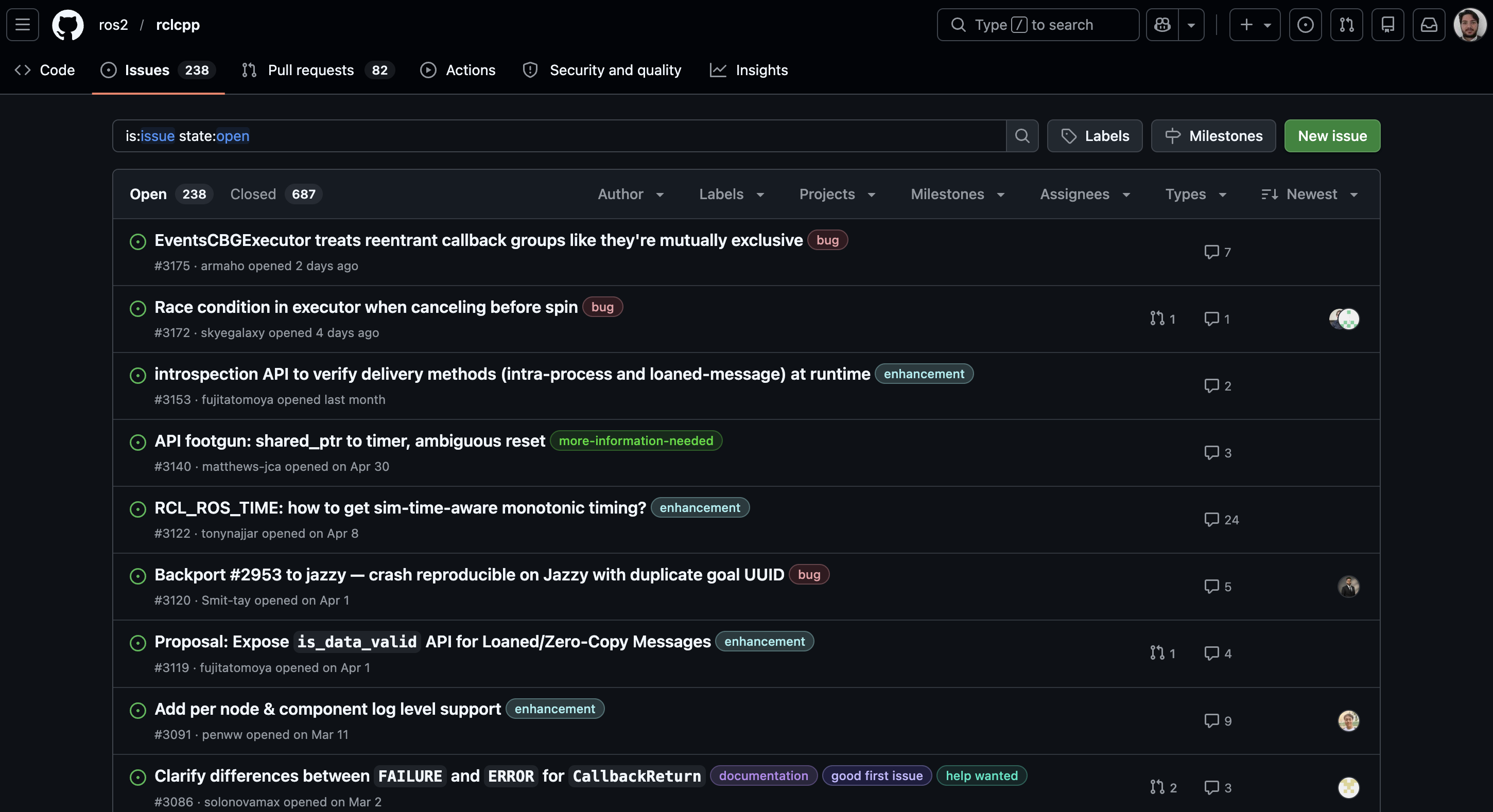
Each issue has one or more labels attached, usually added by maintainers to help people filter and navigate them.
The first thing to know is that as soon as a new issue is opened (or shortly after), it gets tagged as a bug, an enhancement, or documentation, giving us an early sense of what kind of work is involved.
Two other labels worth knowing about are help wanted and good first issue. The former marks issues that maintainers think are suitable for community members to pick up. The latter flags issues considered more accessible for first-time contributors. Filtering by these is always a good starting point.
One more thing to watch for when choosing an issue, especially if you’re still finding your footing, is how mature the discussion is. Let me elaborate. When someone opens an issue, one or more maintainers will weigh in, starting a design discussion. The goal is first to understand the problem and decide whether a change is worth pursuing. Then, if the answer is yes, to agree on the best way to implement it. Maintainers often provide detailed guidelines and expected behavior at this stage. Once that happens, the issue is mature enough to work on safely: there’s already an implementation idea, and the maintainers can easily guide you because the solution is clear in their heads.
Now, I don’t feel like fixing bugs at the moment (it would feel too much like real work). So, I’m looking for an enhancement, with or without help wanted, preferably where maintainers have already aligned on a concrete design plan.
And the winner is issue 2981: a request for a new API that lets users save and load all parameters of a specific node to and from a YAML file. It’s interesting to me because the maintainers have already agreed on an approach, and the feature touches both rcl and rclcpp on the rolling development branch.
To make it official, the next step is to join the discussion and confirm nobody else is already working on it.
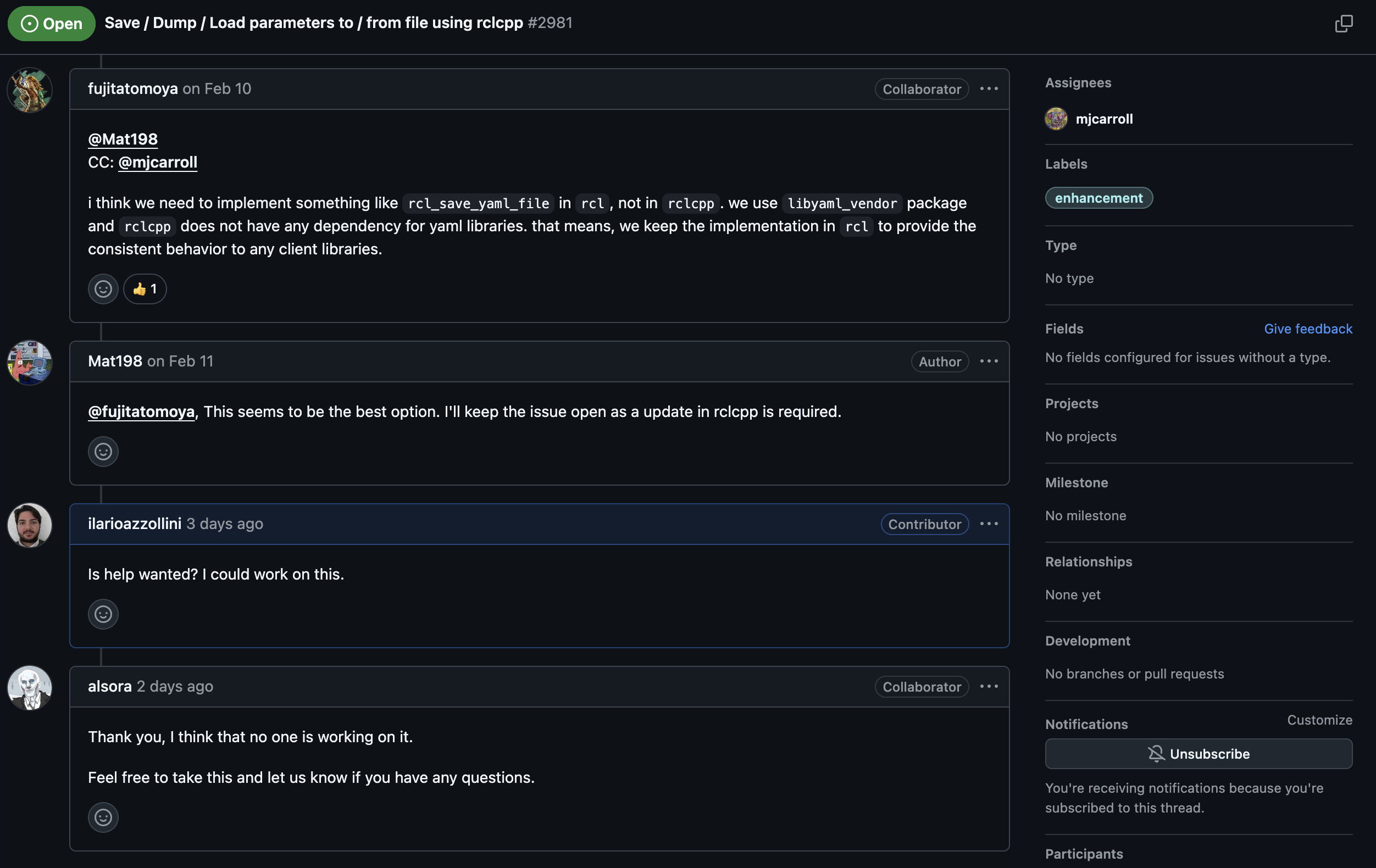
And it is on!
2. Setup the development environment
The goal is to start developing as soon as possible, with an environment that works seamlessly on Linux, macOS, and Windows and relies on as few system dependencies as possible, all of which should be free to use, at least for non-commercial purposes. For these reasons, we will rely on Docker to containerize our development environment. This approach ensures that everyone works in the same reproducible environment, regardless of their host operating system.
The machine on which Docker is installed, and from which we build Docker images and run Docker containers, will be referred to as the host PC. Regardless of the host PC’s operating system, all development work in this guide will take place inside an Ubuntu Docker container. This is because Ubuntu is at the core of the official Open Source Robotics Foundation (OSRF) Docker images.
Warning: This holds as long as our work does not involve graphics and graphical user interfaces. Allowing a container to access and use the display of the host PC is not always straightforward: it is easy to share the display when the host PC runs Linux, but more involved on a Windows or macOS host PC.
2.1 Prerequisites
The following tools are required:
After installing these tools (and ensuring they are available in your system PATH), open a terminal or PowerShell and run the following commands:
git --version
docker --version
code --version
If the installation was successful, each command should print the installed version without errors.
2.2 The ros-dev repository
To streamline development, I’ve created the ros-dev repo, which you can fork and clone so we can start building right away.
Let us follow its main README.md file together.
Open a terminal, navigate to the directory where you want to clone this repository, and clone it with the following command (or clone your personal fork instead):
git clone git@github.com:ilarioazzollini/ros-dev.git
cd ros-dev
Note: From this point on, all terminal commands in this guide should be executed from the root directory of this repository unless otherwise specified.
Now we can build the Docker container image by running:
docker build --platform linux/amd64 -f docker/Dockerfile -t ros-rolling-dev .
Then run a container from the image we just built:
docker run --platform linux/amd64 -it --rm --privileged --network=host --ipc=host -v ${PWD}:/root/ros-dev -w /root/ros-dev --name ros-dev-container ros-rolling-dev bash
We should now be inside a terminal session running in the Docker container, and we can confirm that it is an Ubuntu container by running:
lsb_release -a
For now, let us simply exit, which shuts down and automatically removes the container:
exit
Finally, let us create a new branch dedicated to the specific work we will do for this issue:
git checkout -b ilo/rclcpp-issue-2981
2.3 Preparing the needed ROS 2 repos
As already mentioned, we will work on rcl and rclcpp. The first step is to fork both of them. If you have already forked them, sync your forks with the upstream repos instead.
In my case, I had already forked rclcpp from an earlier contribution, so I just need to sync it. That’s easy: I only have to click Sync fork and then Update branch.
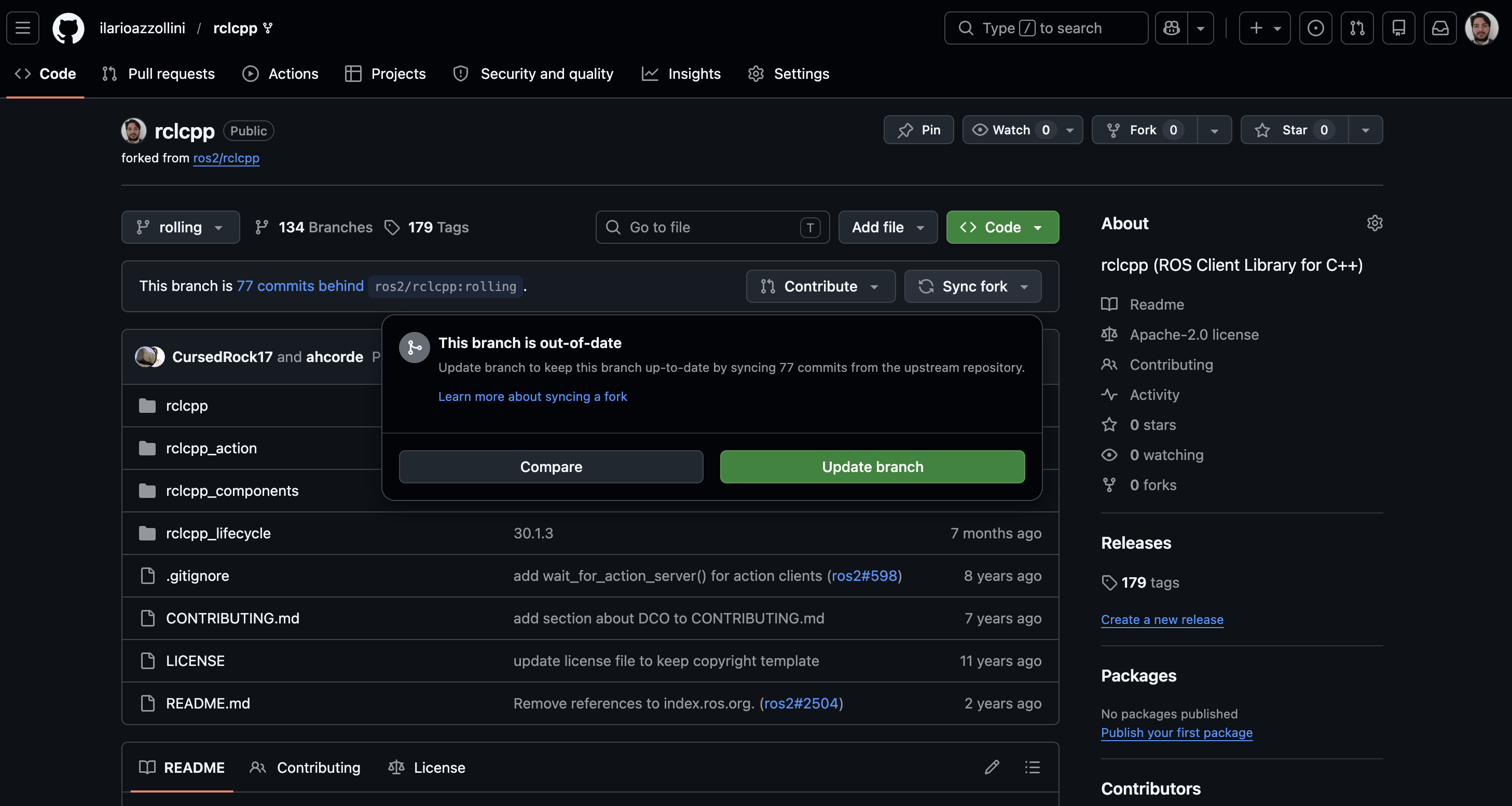
After that, I can clone it into the ros-dev/repos folder:
cd ros-dev/repos/
git clone git@github.com:ilarioazzollini/rclcpp.git
check that it is on the rolling branch:
cd rclcpp
git status
and immediately create a new branch to work on the issue:
git checkout -b ilo/rclcpp-issue-2981
For rcl, I do the same, except that this time I start by creating the fork.
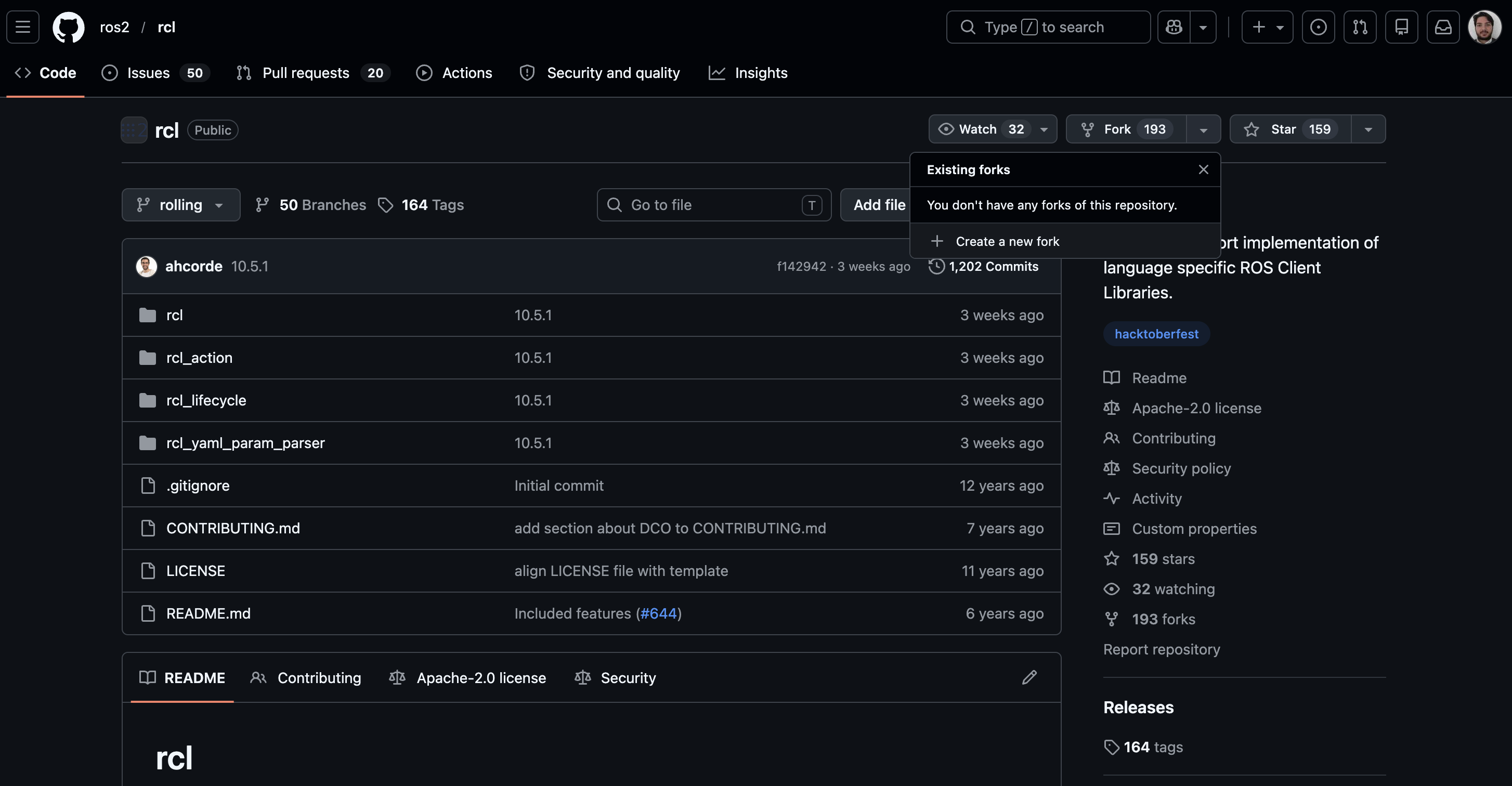
Be sure to uncheck the “Copy the rolling branch only” checkbox, since we may later want to backport the changes to other ROS 2 distributions as well.
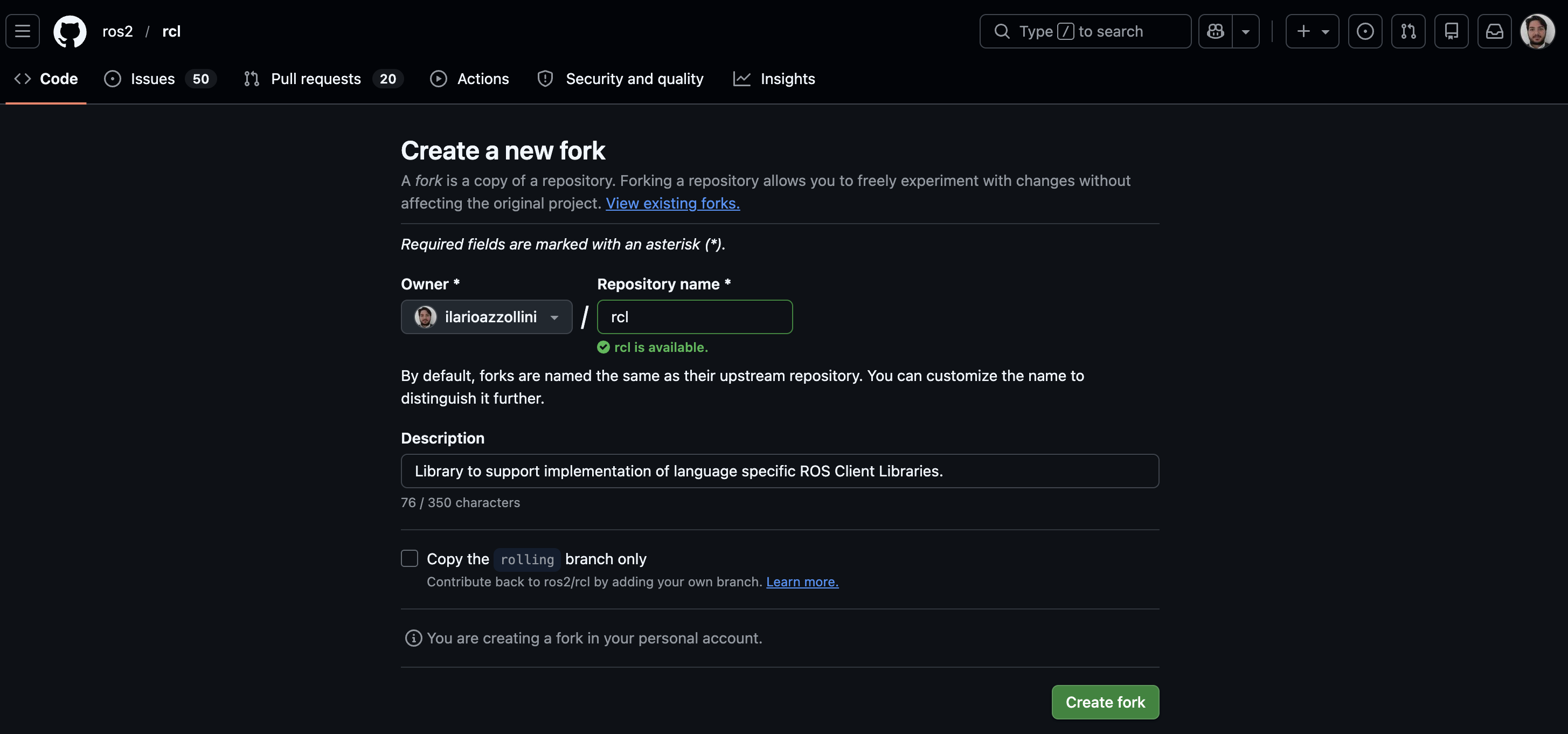
As before, I can clone it into the ros-dev/repos folder:
cd ros-dev/repos/
git clone git@github.com:ilarioazzollini/rcl.git
check that it is on the rolling branch:
cd rcl
git status
and immediately create a new branch to work on the issue:
git checkout -b ilo/rclcpp-issue-2981
2.4 Building the ROS 2 workspace
Going back to the ros-dev README.md file, we can now set up the workspace.
First, let us start the Docker container again (or the VS Code DevContainer) and link the repos we just cloned into ros-dev/ros2_ws/src/ (everything under this folder will be built and tested):
ln -s /root/ros-dev/repos/rcl /root/ros-dev/ros2_ws/src/rcl

ln -s /root/ros-dev/repos/rclcpp /root/ros-dev/ros2_ws/src/rclcpp
Now we can use the convenience scripts to build and test the whole workspace. Since this is the first time, let us use the following one:
bash /root/ros-dev/scripts/clean_build_test.sh
After a while, we should have successfully built both rcl and rclcpp (tests included!).
3. Working on the issue
In order to attack the issue, we are going to follow these steps:
- explore what already works and clearly understand where the capability gap is;
- map the current capabilities to the source code in
rclandrclcppand study it in more details; - understand the design idea the maintainers/contributors already came up with and express possible doubts, ask for extra clarifications, or propose an alternative design.
3.1 Exploring what already works
In order to explore what already works, we will create an ament_cmake demo package in the ros-dev repo. The package is called issue_2981_demo and can be found here.
Following its README.md we see 5 demos. The first four are related to existing behavior, while the fifth will work once we’ll add the new feature.
3.1.1 The load_demo
With the load_demo (source code here), we show how to use rclcpp::parameter_map_from_yaml_file(path).
In particular, by parsing a valid YAML file, we get an rclcpp::ParameterMap: a map having fully qualified node names as keys, and the corresponding list of parameters as values.
const rclcpp::ParameterMap map = rclcpp::parameter_map_from_yaml_file(path);

std::cout << "loaded " << map.size() << " node(s) from " << path << ":\n";
for (const auto & [node_fqn, params] : map) {
  std::cout << node_fqn << ":\n";
  for (const auto & p : params) {
    std::cout << "  " << p.get_name() << " = " << p.value_to_string() <<
      "  (" << p.get_type_name() << ")\n";
  }
}
Following the demo instructions, we run it against the package’s sample params file. For brevity, the commands from here on use $P for the demo’s params directory, which we can set once with:
export P=/root/ros-dev/ros2_ws/src/issue_2981_demo/params
Then:
ros2 run issue_2981_demo load_demo $P/sprayer_params.yaml
and we get as output:
loaded 1 node(s) from /root/ros-dev/ros2_ws/src/issue_2981_demo/params/sprayer_params.yaml:
/sprayer:
  enabled = true  (bool)
  nozzle_pressure_bar = 2.500000  (double)
  spray_pattern = no  (string)
  active_zones = [zone_a, zone_b, zone_c]  (string_array)
  max_speed_mps = 1.800000  (double)
  pass_count = 3  (integer)
3.1.2 The param_holder_node demo
The load_demo parsed a file in isolation, with no ROS node involved. The param_holder_node demo (source code here) brings up a real node, our /sprayer, that holds a handful of parameters, and shows the three parameter-file capabilities the ROS 2 CLI already gives us:
- loading parameters at startup with
ros2 run <package> <node> --ros-args --params-file <file> - dumping parameters at runtime with
ros2 param dump <node>(which we can redirect into a file) - loading parameters at runtime with
ros2 param load <node> <file>
The node itself is deliberately boring: it just declares its parameters and spins.
class SprayerNode : public rclcpp::Node
{
public:
  SprayerNode()
  : Node("sprayer")
  {
    declare_parameter("enabled", true);
    declare_parameter("nozzle_pressure_bar", 2.5);
    // Deliberately YAML-ambiguous: unquoted `no` parses back as the
    // boolean `false`, not the string "no".
    declare_parameter("spray_pattern", std::string("no"));
    declare_parameter("active_zones",
      std::vector<std::string>{"zone_a", "zone_b", "zone_c"});
    declare_parameter("max_speed_mps", 1.8);
    declare_parameter("pass_count", 3);
  }
};
In a first terminal, we bring the node up and initialize its parameters from a file:
ros2 run issue_2981_demo param_holder_node --ros-args --params-file $P/sprayer_params_gentle.yaml
Then, in a second terminal, we can dump its current parameters to standard output:
ros2 param dump /sprayer
/sprayer:
  ros__parameters:
    active_zones:
    - zone_a
    enabled: true
    max_speed_mps: 0.9
    nozzle_pressure_bar: 1.2
    pass_count: 1
    qos_overrides:
      /parameter_events:
        publisher:
          depth: 1000
          durability: volatile
          history: keep_last
          reliability: reliable
    spray_pattern: mist
    start_type_description_service: true
    use_sim_time: false
Because this is a valid YAML file, we can just redirect it into one (ros2 param dump /sprayer > dumped.yaml) to save the node’s parameters. So, externally, saving already works. Let us keep this in mind: it’s exactly the gap the new feature closes from inside the node’s own process.
We can also load a different configuration into the running node at runtime:
ros2 param load /sprayer $P/sprayer_params.yaml
Set parameter enabled successful
Set parameter nozzle_pressure_bar successful
Set parameter spray_pattern failed: Wrong parameter type, parameter {spray_pattern} is of type {string}, setting it to {bool} is not allowed.
Set parameter active_zones successful
Set parameter max_speed_mps successful
Set parameter pass_count successful
Warning: Notice that spray_pattern failed to load. This is a real bug, but not in the code we’re about to change: it lives in the ros2 param load CLI (the rclpy code path), which re-infers the value’s type from a re-stringified copy and loses the fact that it was the quoted string "no" in the source YAML, so it tries to set it as a boolean. The parameter simply keeps its previous value. It’s a nice illustration of exactly why YAML-safe (de)serialization of parameters is worth getting right, but fixing it is out of scope for this issue.
3.1.3 The switch_config_demo demo
ros2 param load is convenient, but it is a Python command-line tool: the ros2 param verb lives in ros2cli and is built on rclpy (this is exactly why the bug we just saw is an rclpy one). The same runtime-load capability is also available directly from C++, and that is what the switch_config_demo demo (source code here) shows: the same load done purely from C++, with no shell involved, through rclcpp::SyncParametersClient::load_parameters(yaml_filename), whose own doc comment says it “behaves like command-line tool ros2 param load would.” The two are actually independent implementations of the same idea, i.e. neither one wraps the other; both are just clients that push parameters onto a running node through its parameter services over the ROS graph.
auto owner_node = std::make_shared<rclcpp::Node>("switch_config_demo");
auto client = std::make_shared<rclcpp::SyncParametersClient>(owner_node, target_node);

client->wait_for_service();

const std::vector<rcl_interfaces::msg::SetParametersResult> results =
  client->load_parameters(yaml_path);
With param_holder_node running in one terminal (as before), we call the demo from another, pointing it at the target node and a YAML file:
ros2 run issue_2981_demo switch_config_demo /sprayer $P/sprayer_params.yaml
loading .../sprayer_params.yaml into /sprayer -- in-process C++ (rclcpp::SyncParametersClient::load_parameters), no ros2 CLI involved
6 parameter(s) set, 0 failure(s).
Notice the 0 failure(s), and note that this is the very same sprayer_params.yaml, with the same spray_pattern: "no", that made ros2 param load choke a moment ago. Here it goes through cleanly. Checking the node confirms it:
ros2 param get /sprayer spray_pattern
String value is: no
Same file, same node, same parameter services, opposite outcome: where the rclpy CLI misread no as a boolean and left the value untouched, the rclcpp client sets it correctly to the string no. The reason is exactly the one from the previous section, i.e. this path parses the file through rcl_yaml_param_parser (the same path load_demo uses) instead of re-inferring the type in Python. Under the hood the demo is the same two pieces we’ve already seen: parse the YAML into a ParameterMap (like load_demo), then set those parameters on the target node over the ROS graph.
3.1.4 The self_reload_demo demo
Both of the previous loads reach the target node through its parameter services, i.e. a request over the ROS graph, even when everything happens to run on the same machine. But a node doesn’t actually need any of that to reload its own configuration. The self_reload_demo demo (source code here) shows the most direct case, and arguably the one closest to what the issue itself asks for (“a decentralized, in-node way…“): a single node reloading parameters straight from a file into itself, with no services and no second process at all.
The whole reload is three lines, all built from APIs we’ve already met:
const rclcpp::ParameterMap map = rclcpp::parameter_map_from_yaml_file(
  yaml_path, node->get_fully_qualified_name());
const std::vector<rclcpp::Parameter> params = rclcpp::parameters_from_map(map);
const std::vector<rcl_interfaces::msg::SetParametersResult> results =
  node->set_parameters(params);
We can run it in a single terminal, with no other node needed. It declares the same parameters as param_holder_node, prints them, reloads a different file into itself, and prints the result:
ros2 run issue_2981_demo self_reload_demo $P/sprayer_params_gentle.yaml
--- before (this process's own declare_parameter() defaults) ---
  active_zones = [zone_a, zone_b, zone_c]
  enabled = true
  max_speed_mps = 1.800000
  nozzle_pressure_bar = 2.500000
  pass_count = 3
  spray_pattern = no

reloading .../sprayer_params_gentle.yaml into this same node, in-process -- no ros2 CLI, no parameter services, no second terminal

6 parameter(s) set, 0 failure(s).

--- after (reloaded from file, same process, same node) ---
  active_zones = [zone_a]
  enabled = true
  max_speed_mps = 0.900000
  nozzle_pressure_bar = 1.200000
  pass_count = 1
  spray_pattern = mist
Nothing here is new API: it’s the same load path load_demo already exercises, combined with the Node::set_parameters() every node already has.
Between these three demos, one thing becomes clear: loading parameters at runtime is already a solved problem, available in several flavors, from the CLI down to a fully in-process, service-less call. What’s conspicuously missing is the mirror image, i.e. saving a node’s live parameters back to a YAML file, correctly, from inside its own process. That’s the gap issue 2981 asks us to close, and the subject of the fifth and final demo.
3.1.5 The param_holder_node_save demo
The fifth and final demo is the mirror image of everything we have seen so far, and the only one that does not run yet. The param_holder_node_save demo (source code here) brings up the same /sprayer node, then, instead of just exiting on Ctrl-C, tries to serialize its own live parameters to YAML and write them to a file, entirely from inside its own process.
The catch is right there in the code:
// On shutdown, serialize this node's own parameters to a YAML string...
const std::string yaml = rclcpp::serialize_parameters(
  node->get_node_parameters_interface(),
  node->get_node_base_interface());

// ...print it, and write it wherever we like.
std::cout << yaml;
std::ofstream(save_path) << yaml;
rclcpp::serialize_parameters() is a function that does not exist yet. It is precisely the API issue 2981 asks us to add. So unlike the first four demos, this one does not compile against today’s rclcpp: it is written against the future. We are looking at it now, in the “before” picture, because it makes the capability gap concrete, i.e. it is the exact code a user would want to write, and can’t.
One might reasonably ask: why can’t the user just hand-roll it today? After all, Node already offers get_parameters(), and each rclcpp::Parameter has a value_to_string(). Couldn’t we loop over them and concatenate a YAML document ourselves? Remember our spray_pattern, deliberately set to the string "no", and how it already misbehaved back in the param_holder_node demo, where a load tried to set it as a boolean. A naive, hand-built serializer walks straight into the same problem: it would emit it as a bare
spray_pattern: no
and an unquoted no is read back as the boolean false, silently corrupting the value on the next load. Producing correct YAML means quoting exactly the values that need it, i.e. reproducing all of libyaml’s emitter rules, which is not something anyone should be doing by hand. That is the whole reason the serializer will belong down in rcl_yaml_param_parser, on top of the same libyaml the parser already uses, something the next section will make much clearer once we have seen how loading works from the inside.
So, what do we expect this demo to produce once the feature exists? Running the node, then pressing Ctrl-C, should serialize its parameters and hand back a proper YAML document, with spray_pattern correctly quoted:
/sprayer:
  ros__parameters:
    active_zones:
    - 'zone_a'
    - 'zone_b'
    - 'zone_c'
    enabled: true
    max_speed_mps: 1.8
    nozzle_pressure_bar: 2.5
    pass_count: 3
    spray_pattern: 'no'
And the proof that it round-trips: feeding that saved file back through load_demo (our very first demo) should show spray_pattern returning as the string it started as, not a boolean:
ros2 run issue_2981_demo load_demo /tmp/sprayer_saved.yaml
  ...
  spray_pattern = no  (string)
  ...
That is the target. Everything from here on, from the design discussion, through the rcl serializer, to the thin rclcpp wrapper, exists to make this one demo go from “does not compile” to “does exactly that.” But before writing a line of it, let us step back and map the whole landscape of save/load capabilities.
3.1.6 Stepping back: the save/load landscape
We have now seen five demos. Before we start building, it is worth drawing the whole map. Parameters move along two independent axes:
- in-process vs over the graph – a node acting on itself (no ROS graph, no parameter services) versus a client acting on some other node through its parameter services;
- load vs save – pulling parameters in from a YAML file versus pushing them out to one.
That is a two-by-two capabilities matrix. Here is where each of our demos lands, and which cells are still empty:
| Load (file → params) | Save (params → file) | |
|---|---|---|
| In-process (a node, itself) | works — self_reload_demo (as an un-named composition) |
the gap #2981 fills — param_holder_node_save / rclcpp::serialize_parameters() |
| Over the graph (a remote node) | works — switch_config_demo (SyncParametersClient::load_parameters) and the ros2 param load CLI |
missing — no rclcpp call; only the ros2 param dump CLI |
Three of the four cells are already filled, and our first four demos walked through them. The in-process load cell (self_reload_demo) and the over-the-graph load cell (switch_config_demo, plus the ros2 param load CLI seen in param_holder_node) cover the whole load row. Saving is the sparse column: the only save capability that exists today is the external ros2 param dump CLI (the over-the-graph save cell), and there is no rclcpp/rcl function for saving anywhere.
The one cell this contribution fills is in-process save – a node serializing its own parameters, correctly, from inside its own process – which is exactly what param_holder_node_save is written against. But notice the empty over-the-graph save cell too: even once we add serialize_parameters(), there will still be no C++ way for a client to dump a remote node’s parameters to a file (the mirror of load_parameters, and the rclcpp equivalent of ros2 param dump). We will not build that here, but it is worth keeping in view – the demo package’s README sketches these follow-ups, and this whole map is what motivates them.
For now the takeaway is simple: loading is a solved problem in several forms; saving is the gap, and in-process save is the cell we are here to fill. With the landscape clear, the rest of this post is about filling that cell properly – which means first understanding the machinery underneath.
3.2 Tracing a YAML load from rclcpp down into rcl
Now that we know what already works, let us understand how. The most relevant API for starting our analysis is the rclcpp function: rclcpp::parameter_map_from_yaml_file. Following it will take us out of rclcpp entirely and down into rcl, where the real YAML work happens.
3.2.1 The rclcpp entry point
Let us open parameter_map.cpp and look at the function itself. It is surprisingly short:
rclcpp::ParameterMap
rclcpp::parameter_map_from_yaml_file(const std::string & yaml_filename, const char * node_fqn)
{
  rcutils_allocator_t allocator = rcutils_get_default_allocator();
  rcl_params_t * rcl_parameters = rcl_yaml_node_struct_init(allocator);
  RCPPUTILS_SCOPE_EXIT(rcl_yaml_node_struct_fini(rcl_parameters); );
  const char * path = yaml_filename.c_str();
  if (!rcl_parse_yaml_file(path, rcl_parameters)) {
    rclcpp::exceptions::throw_from_rcl_error(RCL_RET_ERROR);
  }

  return rclcpp::parameter_map_from(rcl_parameters, node_fqn);
}
There is barely any C++ here. The function does three things:
- it initializes an empty C data structure,
rcl_params_t, withrcl_yaml_node_struct_init(and schedules its cleanup with a scope guard); - it hands the file path and that struct to
rcl_parse_yaml_file, which does all the actual parsing; - it converts the now-populated C struct into the friendly C++
rclcpp::ParameterMapwe saw in the demos, viaparameter_map_from.
The interesting realization is what is not here. There is no YAML parsing in rclcpp at all: nothing like #include <yaml.h>, no tokenizing, no type inference. rclcpp only orchestrates. All three of the functions doing real work, i.e. rcl_yaml_node_struct_init, rcl_parse_yaml_file, and rcl_yaml_node_struct_fini, come from a header we had to include from another package:
#include "rcl_yaml_param_parser/parser.h"
So to understand loading, we have to leave rclcpp and follow that include down a layer.
3.2.2 Down into rcl: the rcl_yaml_param_parser leaf
That header belongs to rcl_yaml_param_parser, a package living in the rcl repository. This is where the multi-repo nature of this issue comes from. The dependency chain looks like this:
rclcpp::parameter_map_from_yaml_file
   │  (rclcpp)
   ▼
rcl_yaml_param_parser  ──►  libyaml_vendor  ──►  libyaml
   │  (rcl repo)                                 (the C YAML library)
rcl_yaml_param_parser is a small, self-contained leaf utility: it does not depend on rcl proper, on the middleware, or on any ROS communication. It depends only on rcutils and on libyaml (pulled in through libyaml_vendor, a thin ROS packaging of the upstream C library). It is, in fact, the package that owns the whole project’s YAML dependency: rclcpp itself has no libyaml dependency whatsoever.
Note: This clean separation is not an accident, and it matters a lot for us later. Because YAML lives in one low-level leaf package that everyone else calls into, the same parsing behavior is shared by every client library and by rcl’s own --params-file handling. When we get to adding a serializer, this is exactly why it will belong down here in rcl_yaml_param_parser, next to the parser, rather than up in rclcpp.
Its public API, declared in parser.h, is a handful of plain C functions operating on that rcl_params_t struct: lifecycle helpers (rcl_yaml_node_struct_init / _copy / _fini), the parsers (rcl_parse_yaml_file and rcl_parse_yaml_value), an accessor (rcl_yaml_node_struct_get), and a rcl_yaml_node_struct_print that dumps the struct to stdout for debugging. Notice the shape of it: everything moves in one direction, i.e. from YAML text into the struct. We will come back to that.
3.2.3 The data model
Since this package is a leaf whose whole job is to hand you a data structure you then walk, it deliberately breaks one of the repository’s conventions: instead of hiding its types behind an opaque pointer (the PIMPL pattern the rest of rcl uses), rcl_params_t and its friends are fully public and transparent. Every field is spelled out in types.h, and reading it is the fastest way to understand the package:
typedef struct rcl_params_s
{
  char ** node_names;             // one entry per node in the file
  rcl_node_params_t * params;     // its parameters, parallel to node_names
  size_t num_nodes;
  size_t capacity_nodes;
  rcutils_allocator_t allocator;  // stored, so every later step uses the same one
} rcl_params_t;
This is just the C mirror of the rclcpp::ParameterMap (node name to parameters) we already met in load_demo. Each node’s parameters are a parallel-array map of names to rcl_variant_t values, and a rcl_variant_t is a tagged union: exactly one of its bool_value, integer_value, double_value, string_value, or the array variants is non-null, which is how the parser records a parameter’s inferred type.
Filling this struct is the job of rcl_parse_yaml_file. Under the hood it simply drives libyaml’s event stream and translates it into the struct:
rcl_parse_yaml_file
  └─ libyaml emits events (stream / document / mapping / sequence / scalar)
       the parser walks them:
         ├─ map keys      → build the dotted parameter name
         ├─ scalar value  → infer its type → store it in an rcl_variant_t
         └─ sequence item → append to the matching typed array
This event loop, and the type inference in particular, is the subtle part, and it is precisely what makes YAML round-tripping tricky. It is the same machinery that decides an unquoted no is a boolean rather than the string "no", the exact ambiguity our sprayer_params.yaml was built to expose.
3.2.4 The missing return path
Having traced the whole path, one thing stands out. There is a complete, well-worn road into the struct:
YAML file ──► rcl_parse_yaml_file ──► rcl_params_t ──► rclcpp::ParameterMap ──► node parameters
but there is no road out of it. Nothing in upstream rcl_yaml_param_parser turns a populated rcl_params_t back into YAML text: the closest thing, rcl_yaml_node_struct_print, only writes to stdout for debugging and hands you nothing you can save. And because rclcpp deliberately owns no YAML machinery of its own, it has nothing to fall back on either. That is the capability gap in one sentence: the parser is a one-way street. Everything the param_holder_node_save demo wants to do, i.e. serialize a node’s live parameters to a correct YAML string, has to be built on top of a struct that currently only knows how to be filled, never emitted.
That naturally frames the work ahead, and matches what the maintainers had already converged on in the issue thread: the missing serializer belongs in rcl_yaml_param_parser, right beside the parser and on top of the same libyaml it already depends on, with a thin rclcpp free function on top to gather a node’s parameters and call down into it. Designing exactly those two pieces is what the next section is about.
3.3 Understanding the design (and questioning it)
The previous section ended on the shape of the fix: two pieces, a serializer in rcl and a thin free function in rclcpp. That split isn’t ours, though. It is what the maintainers had already worked out in the issue thread, before we ever showed up. And this is exactly the payoff of picking a mature issue: the design conversation has already happened (at least in part), so our first job is to genuinely understand it, and then, ideally, to poke at it a little before writing any code. Blindly implementing a design we don’t fully understand is a great way to end up three commits deep in a direction nobody asked for.
So let us do both: reconstruct the agreed design, then read it critically.
3.3.1 The design the maintainers converged on
Three people shaped it in the thread. @mjcarroll (the assignee) proposed the top-level shape: not a new rclcpp::Node method (keep Node lean), but a free function that serializes a node’s parameters to a std::string, leaving the caller to decide what to do with that string. @fujitatomoya then made the decisive call about where the YAML actually gets produced: not in rclcpp at all, but down in rcl. And @alsora gave the go-ahead to take the issue.
Concretely, that is two new functions. In rcl, inside the rcl_yaml_param_parser leaf we already met:
// serialize an rcl_params_t to a YAML string (the string primitive)
rcutils_ret_t rcl_yaml_node_struct_to_yaml_str(
  const rcl_params_t * params_st, char ** yaml_string);

// ...and a thin convenience that writes that string to a file
rcutils_ret_t rcl_save_yaml_file(
  const rcl_params_t * params_st, const char * file_path);
and in rclcpp, the free function (that param_holder_node_save was written against):
std::string
rclcpp::serialize_parameters(
  NodeParametersInterface::SharedPtr params_interface,
  NodeBaseInterface::SharedPtr base_interface);
Let us put it next to the already existing load path and the symmetry is the whole idea: this is that same road, run backwards.
load (exists):  YAML file  ──parse──►  rcl_params_t  ──►  rclcpp::parameter_map_from_yaml_file  ──►  ParameterMap
save (to add):  node params  ──►  rclcpp::serialize_parameters  ──►  rcl_params_t  ──serialize──►  YAML string
rclcpp::serialize_parameters() gathers the node’s parameters into an rcl_params_t (that is what the two interface arguments are for: the values come from params_interface, the node’s fully-qualified name from base_interface), hands that struct to the rcl serializer, and wraps the resulting C string in a std::string. All the actual YAML production happens in rcl, on top of the same libyaml the parser already uses.
That is the design as the thread left it. But let us look closely at the save row again: the last arrow (rcl_params_t → serialize) is the serializer the maintainers named, yet the first one (node params → rcl_params_t), actually building that struct, is quietly assumed. It turns out that step needs rcl support the thread did not mention explicitely, which is exactly where the critical reading below starts.
Two decisions are worth dwelling on:
- Serialize to a string, not to a file path. It would look tidier to just take a path and write the file. But a node may run somewhere else entirely (a container, another machine) than wherever the “save” is requested, so the library has no business assuming it owns the filesystem destination. Returning a string keeps that choice with the caller, and makes file-writing a one-liner (
std::ofstream("config.yaml") << yaml) rather than a baked-in assumption. - The YAML lives in
rcl, notrclcpp. This is the payoff of the aside in section 3.2.2:rcl_yaml_param_parseralready owns thelibyamldependency,rclcpphas none and shouldn’t gain one, and putting the serializer there means every client library (rclpyincluded) gets the same, consistent save behavior for free. It is the exact reason the parser already lives there.
3.3.2 Reading it critically and proposing a design
Understanding the existing code and the proposed design is always the first step. But the more useful thing a contributor can do next, and the thing maintainers genuinely appreciate, is to push on that design a little, out in the open, before committing to code.
The design needs more than a serializer: it needs a way to build an rcl_params_t. Look again at the save path from section 3.3.1: node params → serialize_parameters → rcl_params_t → serialize → YAML string. The issue thread named only the last arrow (the serializer in rcl), but said nothing about the middle one. And that arrow cannot be taken for granted: before rcl can serialize an rcl_params_t, something has to populate it with the node’s values. The only public way to put values into the struct is the parser, which reads YAML text. There is simply no typed way to hand rcl a bool, a double, or an array of strings and have it build the struct for you.
This implies a second rcl addition alongside the serializer: a small typed build API for rcl_params_t, i.e. a family of setters (rcl_yaml_node_struct_set_bool / _int / _double / _string, plus the array and byte-array variants) that take raw typed C values and store them straight into the struct. With those, rclcpp::serialize_parameters() gathers the node’s parameters, calls one setter per value, and hands the finished struct to the serializer, passing plain typed values across a typed C API and formatting no YAML at all.
Then, every YAML decision (the quoting, the floats, the binary tags) lives in exactly one place, rcl’s serializer, which is what makes “the YAML lives in rcl” (the goal from section 3.3.1) literally true and will also let rclpy, rclrs, and others reuse the same machinery for free.
For the reasons above, my final proposal is to introduce two groups of functions (the serializer the thread already asked for, plus the build API):
// (1) Serialize an rcl_params_t to YAML.
rcutils_ret_t rcl_yaml_node_struct_to_yaml_str(
  const rcl_params_t * params_st, char ** yaml_string);
rcutils_ret_t rcl_save_yaml_file(
  const rcl_params_t * params_st, const char * file_path);

// (2) Build an rcl_params_t from typed C values (no YAML text involved).
rcutils_ret_t rcl_yaml_node_struct_set_bool  (rcl_params_t *, const char * node, const char * param, bool);
rcutils_ret_t rcl_yaml_node_struct_set_int   (rcl_params_t *, const char * node, const char * param, int64_t);
rcutils_ret_t rcl_yaml_node_struct_set_double(rcl_params_t *, const char * node, const char * param, double);
rcutils_ret_t rcl_yaml_node_struct_set_string(rcl_params_t *, const char * node, const char * param, const char *);
rcutils_ret_t rcl_yaml_node_struct_set_bool_array  (rcl_params_t *, const char *, const char *, const bool *,          size_t);
rcutils_ret_t rcl_yaml_node_struct_set_int_array   (rcl_params_t *, const char *, const char *, const int64_t *,       size_t);
rcutils_ret_t rcl_yaml_node_struct_set_double_array(rcl_params_t *, const char *, const char *, const double *,        size_t);
rcutils_ret_t rcl_yaml_node_struct_set_string_array(rcl_params_t *, const char *, const char *, const char * const *,  size_t);
rcutils_ret_t rcl_yaml_node_struct_set_byte_array  (rcl_params_t *, const char *, const char *, const uint8_t *,       size_t);
Why not just build the YAML string in rclcpp (and rclpy, and rclrs) directly? The tempting shortcut is to skip the typed setters and have each client library format the YAML text itself. But then every binding re-implements the same delicate rules (always-quote so no stays a string and does not become a bool, locale-independent floats, !!binary tags) and every one becomes a fresh place for bugs to reappear. Producing that string is the YAML knowledge that is supposed to live in rcl alone; the typed setters are exactly what let the clients avoid re-deriving it.
3.3.3 One design, two repositories
Notice that the proposed enhancement does not live in one place. The serializer is in rcl, while the free function is in rclcpp. And in ROS 2, “two repositories” carries a specific consequence for how you should contribute: one issue and one pull request per affected repository, cross-linked, with the dependency order made explicit.
So the single GitHub issue we started from, rclcpp#2981, is only half the paperwork. The rcl change needs its own issue, in the rcl repo (a “companion” issue), that the rclcpp pull request can then declare a dependency on. And because rclcpp::serialize_parameters() literally calls the rcl function, the ordering is trivial: the rcl piece lands first, the rclcpp piece second, marked Depends on the first.
Opening that companion rcl issue, so the rcl maintainers have the full picture from the start, was the next concrete step. That issue is now open: ros2/rcl#1330. It carries the full proposal and the finer open questions I have deliberately left out of this post (the exact function names, whether rcl_save_yaml_file earns its place, the error-handling type, and so on) since those are precisely the details most likely to shift as the discussion with the maintainers unfolds.